

Have you ever wondered if your dash cam keeps watching even when your car is turned off? Imagine this: your car is parked, unattended, and something unexpected happens.
Would your dash cam catch it all, or would it miss the crucial moments? Understanding how a dash cam works when your car is off can give you peace of mind and protect your vehicle around the clock. You’ll discover the secrets behind this feature and learn how to make sure your dash cam never misses a beat—even when you’re not behind the wheel.
Keep reading to find out how to keep your car safe 24/7.
Credit: www.kentfaith.com
Dash Cam Power Sources
Dash cams need power to work, even when the car is off. Different dash cams use different power sources. Knowing these helps you choose the best option for your needs. Some dash cams have built-in batteries. Others connect to the car’s electrical system. Some use extra devices like power banks. Each power source affects how long the dash cam can record.
Battery-powered Dash Cams
Battery-powered dash cams have a small battery inside. They keep the camera running for a short time after the car stops. Usually, the battery lasts for 10 to 30 minutes. This is enough to capture events right after parking. The battery charges while driving. These dash cams are easy to install and do not need wiring.
Hardwired Dash Cams
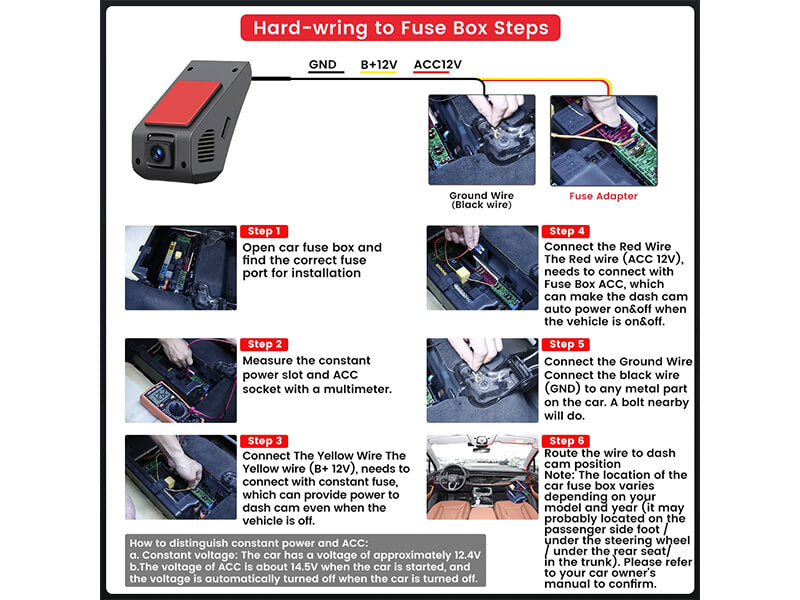
Hardwired dash cams connect directly to the car’s fuse box. They get constant power from the car battery. This allows the camera to work even when the car is off. Some hardwired models have parking mode. They record motion or impact while parked. Hardwiring needs professional installation. It keeps the dash cam always ready.
Using A Power Bank
A power bank is a portable battery you can use with dash cams. It supplies power when the car is off. This extends recording time without tapping into the car battery. Power banks must have enough capacity to last hours or days. They offer flexibility and easy setup. Some drivers prefer this to avoid draining the car battery.
Credit: www.momentocam.com
Parking Mode Features
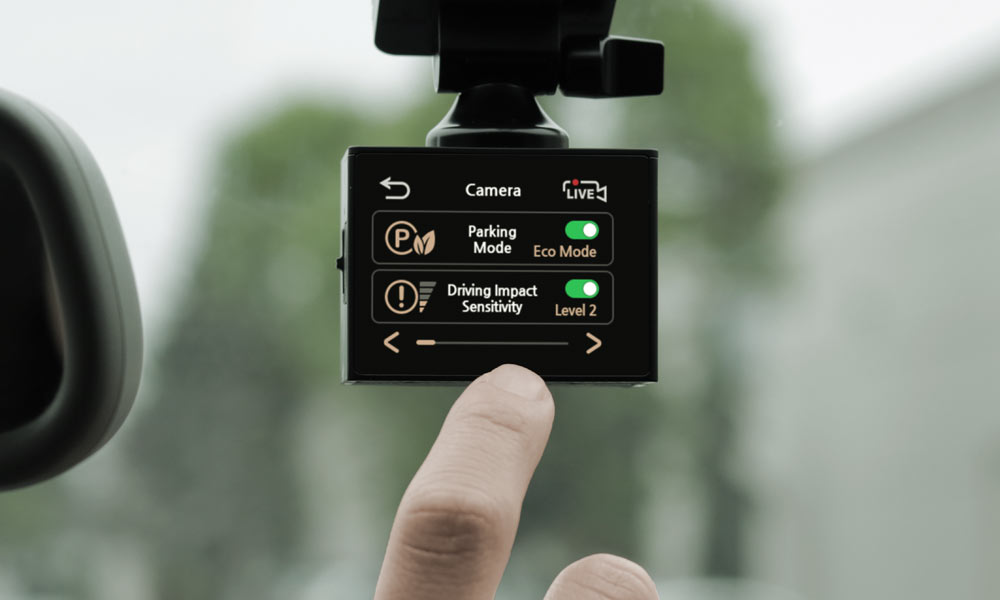
Parking mode features help your dash cam keep watch even when the car is off. They provide extra security by recording events around your parked vehicle. This mode activates the camera only when needed. It saves battery and memory by staying mostly off. Different sensors trigger the dash cam to start recording.
Motion Detection
Motion detection lets the dash cam start recording if it senses movement near the car. This can catch people walking close or suspicious activity. The camera stays in low power mode until it detects motion. It records a few seconds before and after the movement. This feature helps capture clear evidence of incidents around your parked car.
Impact Sensors
Impact sensors detect any physical shocks or vibrations to the car. If someone bumps or hits your vehicle, the sensor triggers the dash cam. It records the event automatically. This feature works even if the impact is small or hard to notice. It protects your car by providing proof of accidents or vandalism.
Time Lapse Recording
Time lapse recording captures footage at set intervals while your car is parked. It uses less storage and power than continuous recording. This method creates a fast video showing long periods in a short time. It helps monitor your car over hours without filling the memory card. Time lapse is useful in busy parking areas or during long stops.
Energy Consumption And Battery Life
Dash cams can keep recording even when the car is off. This feature helps catch events like break-ins or accidents. But it also uses your car’s battery power. Understanding energy use and battery life helps avoid problems.
Dash cams draw power to stay active. This can slowly drain the battery if the car is parked for a long time. Knowing how much energy your dash cam uses is important for safe use.
Battery Drain Risks
Dash cams running while the car is off can drain the battery. This may leave the car unable to start. Some dash cams use too much power. Others have better energy-saving modes. Long parking times increase the drain risk. Cold weather can also reduce battery capacity. Battery drain can cause inconvenience and extra costs.
Power Management Settings
Many dash cams have power management features. These include parking mode timers and motion detection. Timers turn off the camera after a set time. Motion detection records only when it senses movement. These settings reduce battery use. Some dash cams use low power standby modes. Adjusting settings helps balance protection and battery life. Check your dash cam manual for options.
Installation Tips For Off Mode Recording
Recording when your car is off keeps your vehicle safe even when you are away. Proper dash cam installation is key for this feature to work well. Follow these tips to set up your dash cam for off mode recording. This ensures continuous protection and peace of mind.
Focus on power supply methods and battery care. Correct installation avoids damage and saves battery power. Keep your dash cam running without draining your car’s battery.
Choosing The Right Power Setup
Select a power source that supports parking mode or off mode recording. Many dash cams use a low voltage cutoff to protect the battery. A constant power line or a special parking mode battery pack works best. Check the dash cam’s power needs before installation.
Fuse Box Hardwiring
Hardwiring the dash cam to the fuse box is a neat option. Use a fuse tap to connect to a fuse that turns off with the ignition. This setup helps the dash cam switch to parking mode automatically. It keeps your car’s battery safe by cutting power when low.
Safe Battery Usage Practices
Protect your car’s battery by using a voltage monitor. It stops the dash cam from draining the battery too much. Avoid running the dash cam non-stop for long periods. Regularly check battery health to prevent unexpected power loss.
Limitations And Safety Considerations
Dash cams can record even when your car is off. This feature offers extra security. It can capture events like break-ins or parking accidents. Still, there are some limits and safety points to think about. These affect how well your dash cam works and your car’s safety.
Potential Battery Drain Issues
Dash cams use power from your car’s battery when the engine is off. This can slowly drain the battery. If the battery runs out, your car may not start. Some dash cams have low voltage cut-off to stop this. But if your car sits unused for days, the battery could die. Watch your battery health if using parking mode often.
Legal Restrictions
Some places have rules about dash cams. Recording without permission may break privacy laws. In certain states or countries, video or audio recording is limited. Check local laws before using your dash cam while parked. Respect privacy rights to avoid fines or trouble.
Data Security
Dash cams save videos on memory cards or cloud storage. These files can be stolen or hacked. Protect your data with strong passwords if your dash cam supports cloud features. Regularly back up important footage. Secure your device to keep your information safe.
Popular Dash Cam Models With Off Mode
Dash cams with an off mode can keep recording even when the car is off. This feature helps capture events like vandalism or accidents while parked. Many dash cams offer this mode, but they work differently based on power sources.
Some dash cams use built-in batteries. Others connect directly to the car’s battery. Both types have pros and cons depending on your needs.
Top Battery-operated Models
Battery-operated dash cams do not need constant power from the car. They have a small battery inside that powers the camera for a limited time.
These models are easy to install and move between cars. They usually last 10 to 30 minutes after the car is off. Some popular battery-operated models include the Nextbase 622GW and the Viofo A129 Pro.
Best Hardwired Dash Cams
Hardwired dash cams connect directly to the car’s fuse box or battery. They draw power even when the car is off. This allows longer recording during parking mode.
These models often have a voltage cutoff to protect the car’s battery. They can record for hours while parked. The BlackVue DR900X and Thinkware U1000 are top hardwired dash cams with off mode.
Troubleshooting Common Problems
Dash cams are useful tools for recording your car’s surroundings. They often work even when the car is off. Sometimes, problems stop them from working properly. Troubleshooting helps find and fix these issues. This section explains common problems and simple fixes.
Dash Cam Not Recording When Off
Sometimes, the dash cam stops recording after the car turns off. This happens if the cam’s parking mode is not set correctly. Check your dash cam settings to enable parking mode. Some models need a motion sensor or impact sensor to record when off. Make sure these features are activated.
Another cause is low battery protection. The dash cam may turn off to save your car’s battery. You can adjust the voltage cutoff in settings. This allows the cam to keep recording for longer when the car is off.
Power Supply Failures
Dash cams need a constant power supply to work off the car. Power supply problems are common. Check the power cable for damage or loose connections. Use a reliable hardwire kit if you want the cam to run when off.
Fuses can blow and stop power from reaching the dash cam. Inspect the fuse box and replace any blown fuses. Sometimes, the car’s battery or alternator may cause power issues. Test the battery if problems persist.
Firmware Updates
Outdated firmware can cause dash cam errors. Manufacturers release updates to fix bugs and improve features. Visit the dash cam’s official website to check for updates. Follow instructions carefully to install the latest firmware.
Updating firmware often solves recording issues and improves parking mode. Keep your dash cam software current for best performance. Avoid skipping updates to prevent problems when the car is off.
Credit: mercylion.com
Frequently Asked Questions
How Does A Dash Cam Record When Car Is Off?
A dash cam records when the car is off by using a built-in battery or a hardwired power source. Parking mode activates motion or impact sensors, triggering recording to capture incidents even when the engine is off, ensuring continuous surveillance.
Can Dash Cams Drain Car Battery When Off?
Yes, dash cams can drain the car battery if hardwired without protection. Many models include low-voltage cutoffs to prevent battery drain, ensuring the camera stops recording before the car’s battery becomes too weak to start the engine.
What Powers A Dash Cam When The Car Is Off?
Dash cams are powered by either an internal battery or a direct connection to the car’s electrical system. Hardwired dash cams use a parking mode feature, drawing minimal power to stay active while the vehicle is turned off.
Does Parking Mode Consume More Power In Dash Cams?
Parking mode uses more power than regular recording because sensors remain active. However, modern dash cams optimize energy use by only recording when motion or impact is detected, balancing power consumption and security.
Conclusion
A dash cam can keep recording even when your car is off. It uses a special power source or battery to do this. This helps capture events like parking accidents or theft attempts. Knowing how it works helps you choose the right dash cam.
Always check your car’s battery and dash cam settings. This way, you stay protected at all times. Dash cams offer peace of mind beyond driving hours. Simple but useful technology for your safety and security.


