

If you need to access the parts inside your 2007 Silverado’s steering wheel column, the first step is removing the steering wheel column cover. It might seem tricky at first, but with the right steps, you can do it quickly and safely.
This guide will walk you through exactly how to remove the cover without causing any damage. By the end, you’ll feel confident handling this task on your own, saving time and money. Ready to get started? Let’s dive in.
Tools Needed
Removing the steering wheel column cover on a 2007 Silverado needs the right tools. Using proper tools makes the job easier and safer. Prepare all tools before starting to avoid interruptions.
Phillips Screwdriver
A Phillips screwdriver is essential for removing screws holding the cover. Choose the right size to avoid stripping screws. A medium-sized Phillips head works best for this task.
Flathead Screwdriver
A flathead screwdriver helps gently pry apart plastic clips and panels. Use it carefully to avoid damaging the cover or surrounding parts. It is useful for tight spaces where fingers cannot reach.
Socket Wrench Set
Some bolts may secure the steering column cover. A socket wrench with the correct socket size makes removing these bolts simple. Typically, a 7mm or 8mm socket fits well on Silverado bolts.
Trim Removal Tool
A plastic trim removal tool protects the plastic parts from scratches. It helps to release clips without breaking them. This tool is safer than using metal tools for prying.
Work Light
Good lighting is crucial to see screws and clips clearly. A small work light or flashlight brightens dark areas under the steering column. This prevents missing hidden fasteners.
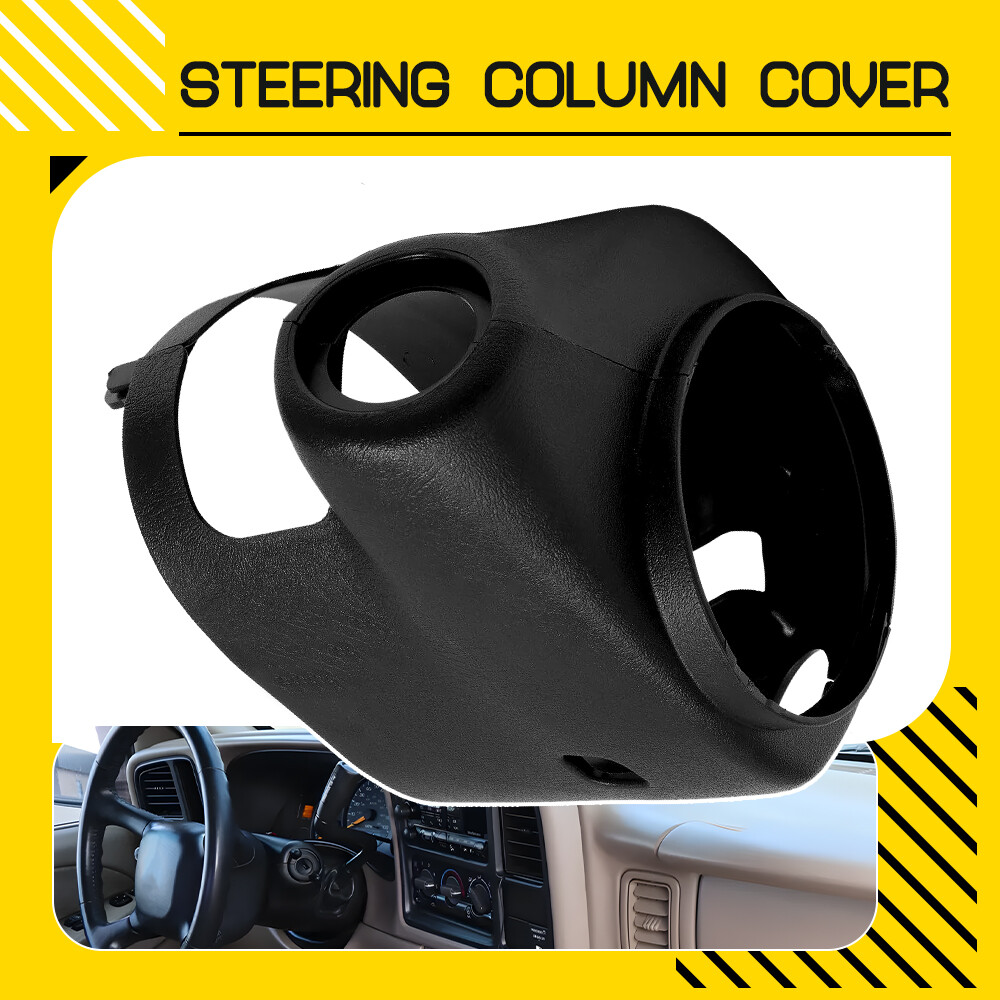
Credit: www.ebay.com
Safety Precautions
Removing the steering wheel column cover on a 2007 Silverado requires care. Safety comes first to avoid injury and damage. Following safety steps protects you and your vehicle.
Disconnect The Battery
Start by disconnecting the vehicle’s battery. This stops electrical power and prevents accidental airbag deployment. Wait at least 10 minutes after disconnecting before touching any parts.
Use Proper Tools
Use the right tools for the job. Incorrect tools can cause damage or slip and hurt you. A screwdriver set and socket wrench usually work best.
Work In A Well-lit Area
Good lighting helps you see screws and clips clearly. It also reduces mistakes and accidents. Choose a bright garage or use a portable work light.
Wear Safety Gear
Wear gloves to protect your hands from sharp edges. Safety glasses guard your eyes from dust and debris. Dress comfortably but avoid loose clothes.
Follow Manufacturer Instructions
Refer to the Silverado manual for specific steps and warnings. Following instructions keeps the job safe and smooth. Manuals offer tips unique to your vehicle model.
Locate Fasteners
Locating the fasteners is the first key step to remove the steering wheel column cover on a 2007 Silverado. Knowing exactly where these fasteners are helps avoid damage to the cover or surrounding parts. The cover is held in place by screws, clips, and sometimes hidden bolts. Each type requires a different approach to remove safely.
Take your time to carefully inspect the steering column area. Spotting all fasteners ensures a smooth removal process. Missing even one fastener can cause the cover to crack or break.
Identify Screws And Clips
Look closely around the steering column for visible screws. Most often, screws are found on the underside of the cover. Use a flashlight to help see into tight spaces. These screws usually hold the two halves of the cover together.
Clips also secure the cover but are less obvious. They fit into small slots and snap the cover tightly in place. Press gently around the cover edges to feel where clips hold. Avoid pulling hard before releasing clips to prevent breaking them.
Check For Hidden Bolts
Sometimes bolts hide behind panels or under small trim pieces near the steering wheel. These bolts add extra security to the cover. Carefully pry off any removable trim pieces using a plastic tool to avoid scratches.
Use a socket wrench to remove any bolts found. Missing these bolts can keep the cover stuck. Double-check every corner of the steering column area for hidden fasteners before trying to remove the cover.
Remove Lower Cover
Start by locating the screws under the steering column. Remove these screws carefully to take off the lower cover. This step gives access to the inner parts of the steering wheel column.
Unscrew Fasteners
Start by locating the screws that hold the lower cover in place. They are usually found underneath the steering column. Use a screwdriver to remove each screw carefully. Keep the screws safe for reassembly. Do not force the screws out to avoid damage.
Gently Pry Off Cover
After removing the screws, gently pry the lower cover away from the steering column. Use a plastic trim tool or your fingers to avoid scratching the surface. Work slowly around the edges to release the clips. The cover should come off without much pressure.
Remove Upper Cover
Removing the upper cover of the steering wheel column on a 2007 Silverado is the first step to access internal parts. This cover protects wiring and components beneath the steering wheel. Handle it carefully to avoid damage. Follow the steps below to remove it properly.
Disconnect Wiring Harness
Start by locating the wiring harness under the cover. Gently unplug the connector by pressing the release tab. Do not pull on wires directly. Disconnecting the harness prevents electrical issues during removal. Keep the wiring safe and out of the way.
Lift Off Cover Carefully
Hold the cover firmly on both sides. Lift it slowly upward to release clips and tabs. Avoid using force that could crack the plastic. If stuck, check for hidden screws or fasteners. Once free, set the cover aside in a safe place.
Troubleshooting Tips
Removing the steering wheel column cover on a 2007 Silverado can sometimes be tricky. Problems like stuck clips or damaged fasteners may slow down the process. This section offers useful troubleshooting tips to help you handle these common issues. Follow these simple steps to avoid damage and finish the job smoothly.
Stuck Clips
Clips often hold the cover tightly in place. They can get stuck due to dirt or wear. Try gently prying the clips with a plastic trim tool to avoid breaking them. Apply small, steady pressure instead of forcing the clips. Warm the area slightly with a hairdryer to soften the plastic. This makes clips easier to release. Avoid metal tools that may scratch or damage the cover.
Damaged Fasteners
Fasteners may break or strip during removal. Inspect each fastener carefully before pulling hard. Use the correct screwdriver or socket size for your fasteners. Replace any damaged screws or bolts with new ones. Keep spare fasteners handy for this repair. A damaged fastener can cause the cover to fit poorly or rattle after reassembly. Take your time to prevent fastener damage.
Reassembly Steps
After removing the steering wheel column cover, it is important to follow the reassembly steps carefully. Proper reassembly ensures the cover fits securely and the steering functions work correctly. Take your time to avoid mistakes and protect your vehicle’s interior.
Align Covers Properly
Start by positioning the upper and lower covers in place. Match the tabs and slots on both parts carefully. Make sure the covers fit flush against the steering column. Misalignment can cause gaps or damage the cover. Check all edges before moving to the next step.
Secure Fasteners
Use the screws or clips removed earlier to fix the covers together. Tighten screws evenly to avoid cracking the plastic. Do not overtighten as it may strip the threads. Confirm all fasteners are secure and the covers do not move. This keeps the cover stable during driving.
Test Steering Functions
Turn the steering wheel left and right to check for smooth movement. Test the horn and any controls on the column cover. Make sure nothing is loose or stuck. Proper testing ensures safety and avoids future repairs. Adjust the cover if you notice any issues.

Credit: www.rotiandchai.co.za

Credit: www.youtube.com
Frequently Asked Questions
How Do I Remove The Steering Wheel Column Cover On A 2007 Silverado?
To remove the cover, first disconnect the battery for safety. Unscrew the lower and upper column cover screws. Gently separate the two halves and carefully pull the cover off. This exposes the steering column components for maintenance or repair.
What Tools Are Needed To Remove Silverado Steering Column Cover?
You typically need a Phillips screwdriver and possibly a flathead screwdriver. A small socket wrench may be helpful if screws are tight. These basic hand tools allow you to unscrew and pry apart the column cover safely.
Can I Remove The Steering Column Cover Without Damaging It?
Yes, to avoid damage, use the correct screwdrivers and apply gentle pressure. Avoid forcing the cover apart as clips can break. Work slowly and keep track of screws for easy reassembly.
How Long Does It Take To Remove The Column Cover On A 2007 Silverado?
It usually takes about 10 to 15 minutes for someone with basic tools. The process is straightforward but requires careful handling to avoid damage.
Conclusion
Removing the steering wheel column cover on a 2007 Silverado is simple. Follow each step slowly and carefully. Use the right tools to avoid damage. Keep screws and parts safe during the process. Take your time to avoid mistakes. This guide helps you do the job yourself.
Save money by doing it at home. Now, you can work on your Silverado with confidence.

