

Your Dyson vacuum cleaner is a powerful tool that helps keep your home spotless. But to make sure it works at its best for years to come, you need to care for it properly.
Neglecting simple maintenance can lead to weaker suction, clogged filters, or even costly repairs. You’ll discover easy and effective tips to keep your Dyson running smoothly. By following these steps, you’ll save time, protect your investment, and enjoy a cleaner home with less effort.
Keep reading to learn how to care for your Dyson vacuum cleaner like a pro.
Dyson Vacuum Basics
Dyson vacuum cleaners are popular for their strong suction and smart design. Understanding the basics helps keep your vacuum working well. This section explains key parts and common Dyson models.
Key Components
Dyson vacuums have a motor, dust bin, and filters. The motor creates suction that pulls dirt inside. The dust bin collects debris and is easy to empty. Filters trap tiny particles to clean the air. Some models have a brush bar to loosen dirt from carpets. The wand and attachments help clean hard-to-reach places. Knowing these parts helps with regular care and maintenance.
Common Models
Dyson offers many models for different needs. The V series includes cordless vacuums that are light and flexible. The Ball series has a ball design for easy steering. Some models focus on pet hair removal. Others are made for homes with hard floors or carpets. Choosing the right model depends on your cleaning tasks and home size. Each model needs similar care to stay effective.

Credit: www.youtube.com
Regular Cleaning Tips
Regular cleaning keeps your Dyson vacuum working well for a long time. Dirt and dust can build up inside. This lowers suction power and makes the vacuum less effective. Simple cleaning tasks done often help keep it running smoothly.
Focus on three main parts: the bin, the filters, and the pathways. Each part needs care to avoid problems. Follow these easy steps to maintain your vacuum’s performance.
Emptying The Bin
Empty the bin after every use or when it is full. Hold the vacuum over a trash can. Press the release button to open the bin. Let all the dust and dirt fall out. Avoid overfilling the bin. A full bin reduces suction and strains the motor.
Washing Filters
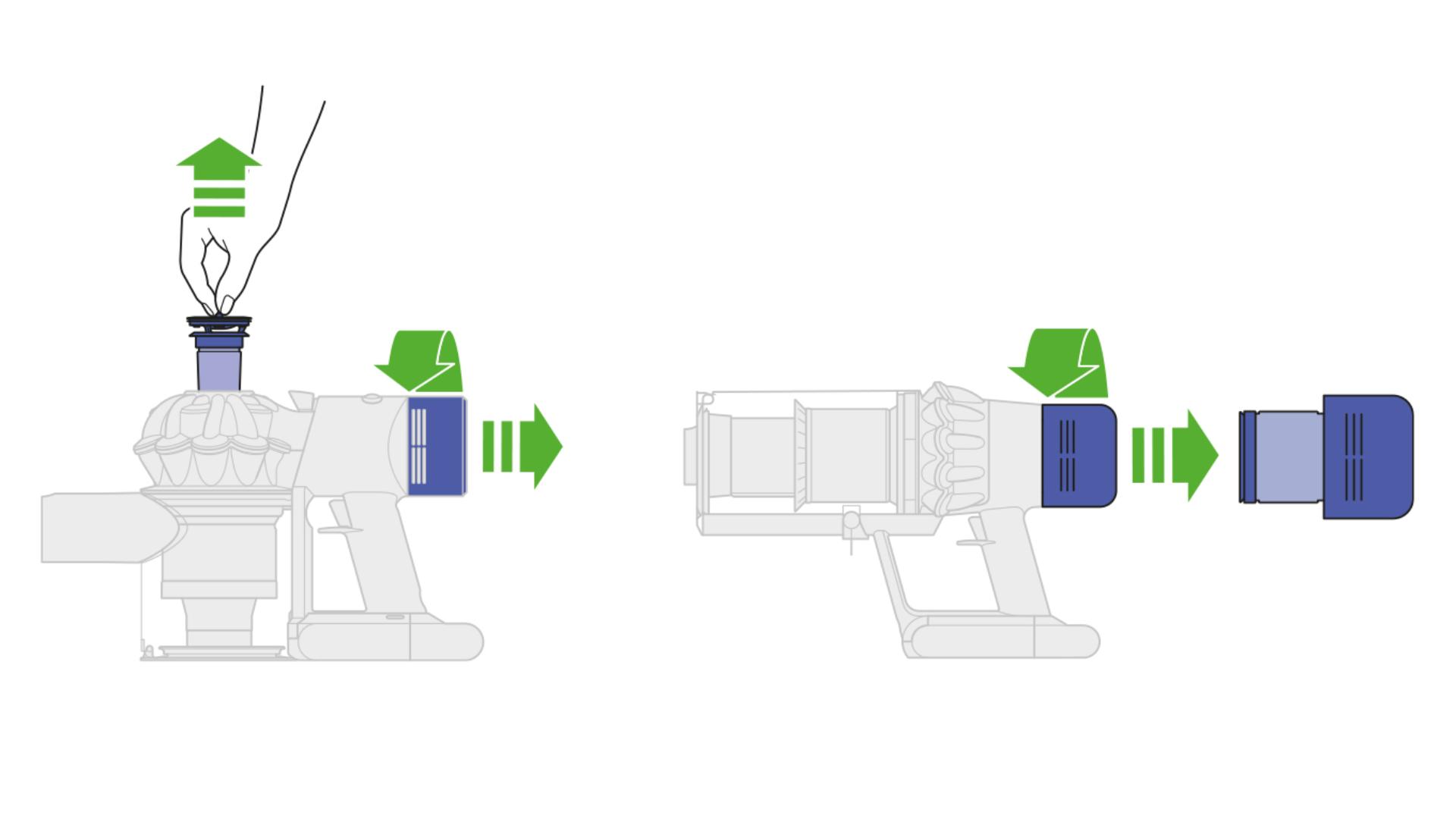
Dyson filters need washing every 1 to 3 months. Remove the filters carefully following the manual. Rinse them under cold water until the water runs clear. Do not use soap or detergents. Let the filters dry completely for at least 24 hours before reinstalling. Wet filters can damage the vacuum.
Checking For Blockages
Blockages slow down your vacuum’s cleaning power. Check the wand, brush bar, and hose regularly. Remove hair, string, or large debris stuck inside. Use a long object like a broom handle to clear the pathway. This keeps the airflow strong and the vacuum efficient.
Maintaining Brushes And Attachments
Maintaining the brushes and attachments of your Dyson vacuum cleaner keeps it working well. Clean brushes and tools help the vacuum pick up dirt better. Regular care stops clogs and damage. It also makes the machine last longer. This section explains how to clean and care for these parts properly.
Cleaning Brush Bars
Turn off and unplug your vacuum before cleaning the brush bars. Remove the brush bar carefully from the vacuum head. Use a soft cloth to wipe dirt and dust off the brush. For stuck dirt, use a pair of scissors to cut it away. Avoid wet cleaning the brush bar to protect its parts. Check for wear and tear and replace if needed.
Detangling Hair And Debris
Hair and threads often wrap around the brush bars. Use your fingers or a comb to pull out the hair. Scissors can help cut tangled hair carefully. Remove all debris so the brush spins freely. Clean this part regularly to keep strong suction. Avoid pulling too hard to prevent damage.
Attachment Care
Attachments like crevice tools and dusting brushes need cleaning too. Wipe them with a damp cloth to remove dust. For sticky dirt, use mild soap and water, then dry completely. Check for cracks or broken parts and replace if necessary. Store attachments in a clean, dry place to keep them safe.

Credit: www.youtube.com
Battery Care For Cordless Models
Battery care is important for Dyson cordless vacuum cleaners. Proper care helps keep the battery healthy and working longer. Batteries can lose power over time if not charged or stored correctly. Following simple steps improves your vacuum’s battery life and performance.
Charging Best Practices
Charge the battery fully before the first use. Use only the charger made for your Dyson model. Avoid charging the battery overnight to prevent overcharging. Unplug the charger once the battery reaches 100%. Store the vacuum with a partially charged battery if not used for a while.
Extending Battery Life
Do not let the battery drain completely before charging. Charge the vacuum regularly, even if you do not use it often. Keep the vacuum and charger in a cool, dry place. Avoid exposing the battery to extreme heat or cold. Clean the battery contacts gently to ensure good connection.
Troubleshooting Common Issues
Dyson vacuum cleaners are built to last, but they can face some common issues. Knowing how to troubleshoot these problems saves time and effort. This section helps you fix common Dyson vacuum problems quickly.
Loss Of Suction
Loss of suction is a frequent issue. Start by checking the filter. Clean or replace it if dirty. Next, inspect the vacuum hose for blockages. Remove any debris that blocks airflow. Empty the dustbin regularly to maintain suction. Also, check the brush bar for tangled hair or threads. Clear them away to improve performance.
Strange Noises
Unusual sounds may mean a problem inside. Turn off and unplug your vacuum. Look for objects stuck in the brush bar or hose. Clear any dirt or debris you find. If the noise continues, check the motor housing for damage. Contact Dyson support if needed to avoid further damage.
Error Messages
Dyson vacuums display error messages on the screen. Note the message code shown. Refer to the user manual for specific meaning. Common errors include battery or filter issues. Reset the vacuum by turning it off and on again. Replace parts if errors do not clear. Regular maintenance reduces error occurrences.
When To Replace Parts
Knowing when to replace parts of your Dyson vacuum keeps it working well. Parts wear out over time. Replacing them on time saves you money and effort. It also keeps your home clean and air fresh.
Filter Replacement
Dyson filters trap dust and dirt. They get clogged after use. Replace the filter every 3 to 6 months. Check the filter for dirt or damage often. A dirty filter lowers suction power and can harm the vacuum.
Brush Bar Wear
The brush bar spins to pick up dirt and hair. It wears down or gets tangled with threads. Replace the brush bar if bristles look worn or missing. Clean it regularly to avoid damage and keep it spinning well.
Battery Replacement
Cordless Dyson vacuums run on batteries. Over time, batteries lose charge quickly. Replace the battery when runtime drops significantly. A fresh battery keeps your vacuum running longer and stronger.
Storage And Handling Tips
Proper storage and careful handling keep your Dyson vacuum cleaner working well. Storing it right saves space and protects the machine. Handling it with care prevents damage and extends its life. Follow these simple tips to care for your vacuum every day.
Proper Storage Methods
Store your Dyson vacuum in a dry, cool place. Avoid areas with high humidity or direct sunlight. Use the wall mount or docking station if your model has one. This keeps the vacuum upright and stable. Make sure the cord is neatly wrapped to prevent tangles. Keep all attachments together in a designated box or holder. This helps you find parts quickly for cleaning.
Avoiding Damage
Do not drop or throw the vacuum cleaner. Handle it gently when moving between rooms. Avoid pulling the vacuum by the cord to prevent internal wire damage. Keep the vacuum away from sharp objects that can scratch or crack it. Clean the filters regularly to avoid blockages and overheating. Check the brush bar for hair or debris to prevent motor strain.
Credit: www.dyson.co.nz
Professional Servicing Options
Professional servicing is key to keeping your Dyson vacuum cleaner in top shape. Regular expert care helps spot issues early. It also keeps your vacuum running smoothly for years. Choosing the right service option protects your investment and ensures reliable cleaning.
Authorized Repair Centers
Authorized repair centers use genuine Dyson parts. They have trained technicians who understand your vacuum well. Repairs done here keep your warranty valid. These centers follow Dyson’s strict service rules. This ensures your vacuum gets proper care without damage.
Warranty Considerations
Check your vacuum’s warranty before any repair. Using non-authorized services may void your warranty. Authorized centers offer repairs covered by Dyson’s warranty. Keep your purchase receipt and warranty details safe. This helps in case you need free repairs or replacements.
Frequently Asked Questions
How Often Should I Clean My Dyson Vacuum Filter?
You should clean your Dyson vacuum filter every 1 to 3 months. Regular cleaning keeps suction strong and prolongs vacuum life. Always follow your model’s manual for specific instructions to maintain optimal performance.
What Is The Best Way To Empty A Dyson Vacuum Bin?
Empty the bin when it’s about half full to avoid clogging. Detach the bin carefully over a trash can and press the release button to drop debris. Clean the bin regularly with a dry cloth for hygiene.
How Do I Maintain The Dyson Vacuum Brush Bar?
Remove hair and debris from the brush bar after each use. Use scissors or a comb to clear wrapped fibers carefully. Regular maintenance prevents blockages and keeps your vacuum running smoothly.
Can I Wash Dyson Vacuum Parts With Water?
Only certain parts like filters can be washed with water, if specified. Always check your model’s manual before washing. Let parts dry completely for at least 24 hours to avoid damage and maintain vacuum efficiency.
Conclusion
Taking care of your Dyson vacuum keeps it working well. Clean filters and empty the dustbin often. Check for blockages and brush the roller regularly. Store it in a dry place to avoid damage. Small steps help your vacuum last longer.
Enjoy a cleaner home with less effort. Regular care saves money on repairs later. Simple habits make a big difference every day. Your Dyson will stay strong and ready to clean. Keep it happy, and it will return the favor.


