

If your 2008 F150’s steering wheel column cover is cracked, worn, or just doesn’t look right, you’re not alone. Replacing it might seem tricky, but with the right steps, you can do it yourself and save time and money.
Imagine how good it will feel to restore that clean, finished look to your truck’s interior. In this guide, you’ll find simple, clear instructions that anyone can follow—even if you’re not a car expert. Ready to bring your steering column cover back to life?
Let’s get started.
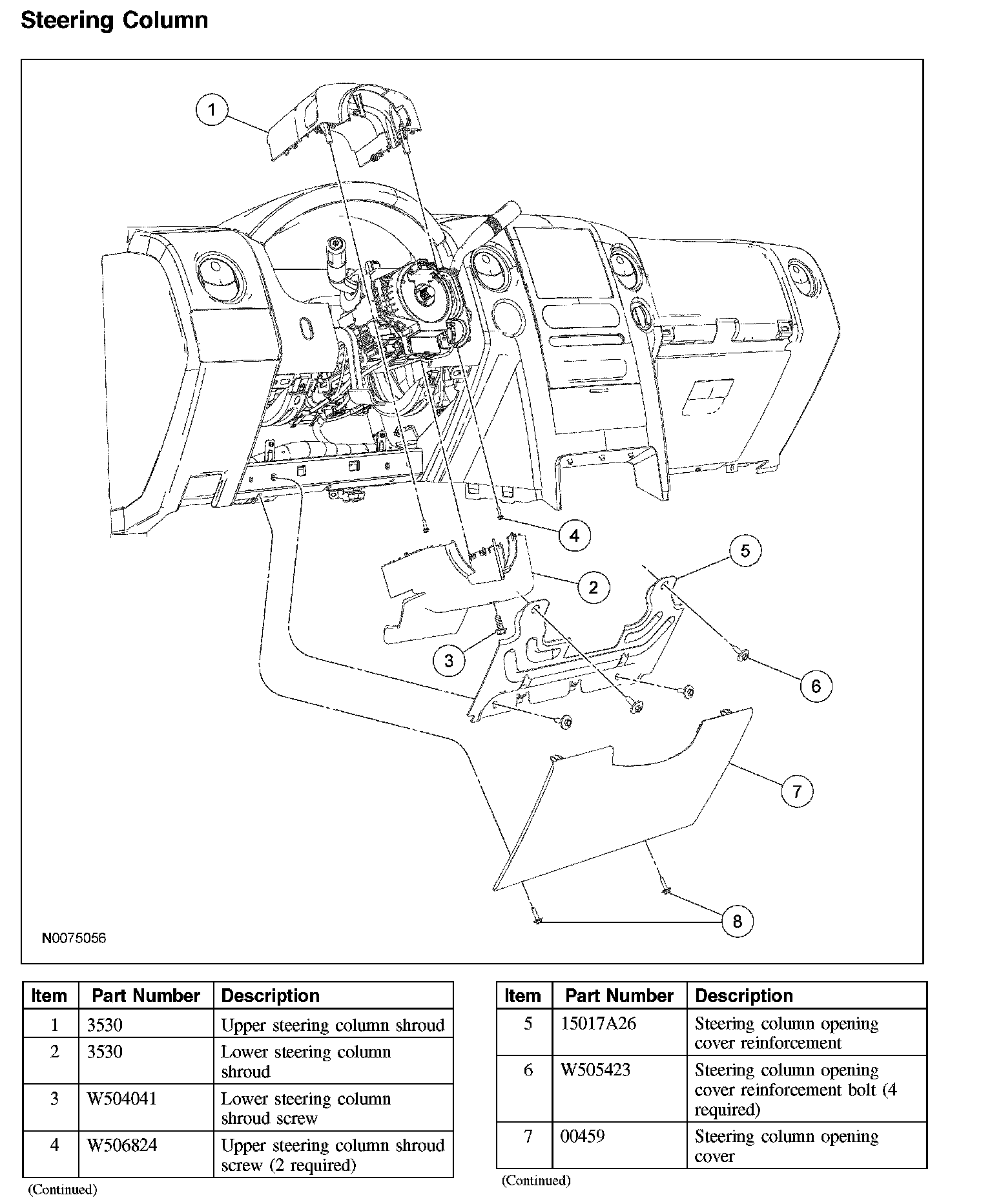
Credit: charm.li
Tools And Materials Needed
Replacing the steering wheel column cover on a 2008 F150 requires a few basic tools and materials. Having the right items ready makes the job easier and faster. This section lists everything needed for a smooth repair.
Basic Hand Tools
You need a set of screwdrivers, including Phillips and flathead. A ratchet with a socket set is useful for bolts. A trim removal tool helps avoid damage to plastic parts.
Replacement Parts
Get the correct steering wheel column cover designed for the 2008 F150. Using the right fit ensures proper installation and a clean look.
Safety Equipment
Wear safety gloves to protect your hands. Safety glasses prevent dust and debris from getting in your eyes. These keep you safe during the repair.
Additional Supplies
Have a flashlight handy for better visibility inside tight spaces. A clean cloth helps wipe off dust and dirt from the area. Keep a container to hold screws and small parts to avoid losing them.

Credit: www.youtube.com
Safety Precautions
Safety is the first step before replacing the steering wheel column cover. This task involves working near important car parts like the airbag and wiring. Taking the right safety steps prevents injury and damage. Follow these safety tips carefully to protect yourself and your vehicle.
Disconnect The Battery
Start by disconnecting the car battery. This stops power from reaching the airbag and electrical parts. Wait at least 10 minutes after disconnecting. This allows the system to fully discharge. Do not skip this step.
Wear Safety Gloves And Glasses
Protect your hands and eyes with gloves and safety glasses. Sharp edges and small parts can cause cuts or eye injury. Safety gear keeps you safe while handling tools and car parts.
Work In A Well-lit Area
Choose a bright, clean workspace. Good light helps you see small screws and connectors clearly. Avoid working in dark or cluttered places. This reduces the chance of mistakes and accidents.
Handle The Airbag With Care
The airbag is sensitive and can deploy unexpectedly. Do not touch or press the airbag cover. Keep it facing away from you. Store it in a safe place until reinstallation.
Use Proper Tools
Select the right tools for the job. Using wrong tools can damage parts or cause injury. A screwdriver set and trim removal tools work best. Keep tools organized and close by.
Removing The Old Steering Column Cover
Removing the old steering column cover is a key step in replacing it. This process helps you access the internal parts safely. It requires care and the right tools. Follow clear steps to avoid damage to your 2008 F150.
Start by preparing your work area. Make sure the vehicle is off and in park. This will make the removal easier and safer. Each part of the cover must come off in order. Let’s break down the removal process into simple parts.
Disconnecting The Battery
Always disconnect the battery first. This stops power to the steering wheel. It prevents accidental airbag deployment. Use a wrench to remove the negative battery cable. Wait a few minutes before continuing. This step protects you and your vehicle.
Removing Screws And Clips
Locate all screws holding the cover. They are usually under the steering wheel and on the sides. Use a screwdriver to remove them carefully. Some covers have clips that snap in place. Gently pry these clips with a plastic tool. Avoid using metal tools to prevent scratches.
Separating The Cover Pieces
The cover comes in two halves. After screws and clips are out, pull the halves apart slowly. Use your hands to avoid breaking the plastic. Work evenly on both sides to loosen the cover. Once loose, remove it completely from the steering column.

Credit: www.reddit.com
Inspecting The Steering Column
Inspecting the steering column is an important step before replacing the 2008 F150 steering wheel column cover. This part holds critical components for steering control and safety. Checking it carefully helps avoid problems later on.
During inspection, look closely at all parts around the column. Make sure nothing is broken or worn out. Clean the area well to remove dust and dirt. This keeps the new cover fitting properly and the steering smooth.
Checking For Damage
Start by examining the steering column for any cracks or dents. Check if the mounting points are secure and not loose. Look for worn wires or connectors that might cause issues. Replace any damaged parts before installing the new cover. This prevents future steering problems.
Cleaning The Area
Use a soft cloth to wipe dust and dirt from the column surface. Avoid harsh chemicals that can damage plastic or metal. Clean all small spaces and corners carefully. A clean surface helps the new cover stick well and look neat. It also keeps the steering column parts working smoothly.
Installing The New Steering Column Cover
Installing the new steering column cover on your 2008 F150 is a simple step. It protects the steering mechanism and keeps everything neat. Follow each step carefully to ensure a perfect fit. Take your time aligning and securing the cover for best results.
Aligning The Cover
Start by placing the new cover near the steering column. Check the shape and holes match the column perfectly. Hold the top and bottom parts together gently around the steering column. Make sure the edges line up well. The cover should fit snugly without forcing it. Adjust until the cover rests evenly on all sides.
Securing Screws And Clips
Locate the screw holes on the cover and column. Insert screws by hand to avoid cross-threading. Tighten screws slowly with a screwdriver until secure. Avoid overtightening to prevent damage. If clips hold the cover, press them firmly until you hear a click. Double-check that the cover is stable and will not move. Proper securing keeps the cover in place while driving.
Reconnecting The Battery And Testing
After replacing the steering wheel column cover on your 2008 F150, reconnecting the battery is the next step. This action restores power to your vehicle’s systems. Testing follows to ensure everything works correctly. It is crucial to check for any issues before driving.
Disconnect Battery Cables Safely
Make sure the battery cables are clean and undamaged. Connect the positive cable first, then the negative cable. Tighten the connections securely to avoid loose contacts. Loose cables may cause electrical problems or warning lights.
Start The Vehicle And Check Systems
Turn the key to start the engine. Watch the dashboard for warning lights. Lights that stay on indicate a problem. Check the horn and turn signals. These controls connect to the steering column and must work properly.
Test Steering Wheel Functions
Move the steering wheel from lock to lock slowly. Listen for unusual noises or resistance. Test the tilt and telescoping functions if equipped. Make sure all buttons on the wheel respond correctly. Confirm no wires are pinched or loose.
Verify Airbag System Status
The airbag light should turn off after a few seconds. If it stays on, inspect the airbag connection. The airbag system is vital for safety. Do not ignore any warning signals related to it.
Troubleshooting Common Issues
Troubleshooting common issues after replacing the steering wheel column cover on a 2008 F150 helps ensure proper function. Small problems can cause big frustrations. Identifying these issues early saves time and effort. This section covers two frequent problems and how to fix them quickly.
Cover Fitment Problems
Sometimes the new cover does not fit right. It may feel loose or uneven around the steering column. Check for leftover parts blocking a snug fit. Dust or debris can stop the cover from sitting correctly.
Use gentle pressure to align the cover edges. Avoid forcing it, which can crack the plastic. If the cover still won’t fit, compare it to the old one. A wrong part could be the cause. Confirm the part number before trying again.
Steering Wheel Controls Not Working
After cover replacement, steering wheel buttons might stop responding. This usually happens if wiring is disconnected or pinched. Remove the cover carefully and inspect the wires and connectors.
Look for loose plugs or damaged wires. Reattach any unplugged connectors firmly. Avoid pulling on wires to prevent damage. Test the controls before fully securing the cover to catch problems early.
Frequently Asked Questions
How Do I Remove The Steering Wheel Column Cover On A 2008 F150?
To remove the cover, first disconnect the battery to avoid airbag issues. Unscrew the screws under the column, then carefully pry off the cover.
What Tools Are Needed To Replace The 2008 F150 Steering Column Cover?
You need a Phillips screwdriver, a flathead screwdriver, and possibly a Torx driver. These tools help in removing screws and prying the cover safely.
Can I Replace The Steering Column Cover Without Professional Help?
Yes, with basic tools and patience, you can replace it yourself. Follow safety steps and instructions carefully to avoid damage or injury.
How Long Does It Take To Replace The Steering Column Cover?
Replacing the cover typically takes 20 to 30 minutes if you have the right tools and follow the steps correctly.
Conclusion
Replacing the 2008 F150 steering wheel column cover is simple with clear steps. Take your time and follow each part carefully. Use the right tools to avoid damage. This small fix improves your truck’s look and feel. Practice patience, and you will finish the job well.
Enjoy driving your F150 with a fresh, neat steering column. Small repairs like this save money and build your skills. Give your truck the care it deserves.


